App comparison
Cal AI alternative: how Zuli compares
A source-based look at two AI calorie tracker apps: what they offer, what “free” means, and what to check before switching.
Looking for a free Cal AI alternative? Zuli offers ad-supported photo and text calorie estimates with daily AI limits, barcode lookup, editable portions, and dark mode. Cal AI offers photo-led tracking too; its App Store listing says food-scanning analysis requires a subscription. Both already support dark mode.
Disclosure: this comparison is published by the Zuli team about our own app. It uses current app source, screenshots and official competitor pages. It is not a hands-on Cal AI review or an accuracy benchmark. Sources checked 23 October 2026.
Zuli vs Cal AI: features to compare
Start with the routine you want to keep. A photo can help when you have a plate in front of you. Text helps when you know ingredients or quantities. Barcode lookup suits packaged food. The useful question is how easily you can review the result and keep a food diary you understand.
| Feature | Zuli | Cal AI |
|---|---|---|
| Food logging | Photo, typed meal description, barcode, saved foods | Photo, barcode and meal description advertised |
| Free access | Ad-supported; daily AI usage limits | Free download; subscription required for food-scanning analysis |
| Appearance | Light, dark or system setting | Dark mode advertised |
| Nutrition | Calories, protein, carbs and fat, with editable entries | Calories, protein, carbs and fat advertised |
| Data export | JSON, XML and Excel from Settings | Not evaluated in this comparison |
| Independent accuracy comparison | No shared, independently tested Zuli-versus-Cal AI benchmark presented here | |
Sources: Zuli screenshots, Zuli App Store listing, Cal AI official features, and Cal AI App Store listing. “Not evaluated” is not a claim that a feature is missing.
These features overlap because both apps address meal logging. Zuli may fit if free access, reviewing individual foods, or exporting your history matters to you. Cal AI may fit if its published workflow and paid offer suit your routine. Compare the actual screens on your phone rather than choosing solely from a feature checklist.
Is Cal AI calorie tracker free?
Cal AI is free to download, but its official App Store description says that food-scanning analysis results require a subscription. Installing the app therefore does not establish free ongoing AI analysis. Read the current offer shown in your local store and in the app. Source: Cal AI App Store description.
What is the Cal AI price?
Use the current checkout screen for the amount, currency, billing period, renewal terms and any trial conditions. A store can list multiple purchases and promotional offers. This page does not label one listed amount as a universal monthly or annual price.
When comparing cost, write down what you will use during an ordinary week. A photo-heavy routine makes the AI allowance important. Repeating the same breakfast may make saved-food reuse more useful than a large scan allowance. Check whether the offer covers your actual logging pattern before deciding which app costs less for you.
Is Zuli free to use?
Zuli provides free access supported by occasional ads. Photo and text AI analysis have daily usage limits, and the app shows the remaining allowance. Barcode lookup and foods you have already saved offer other logging paths. We do not describe this as unlimited AI analysis, and this website does not promise a paid upgrade that is not available.
Download through the Zuli App Store listing or Google Play listing. For other options, read our guide to choosing a free AI calorie tracker.
Does Cal AI have dark mode?
Yes. Cal AI explicitly advertises Dark Mode on its official website. A search for a “Cal AI dark mode feature request” can reflect older information. It is not evidence that the current app lacks this feature.
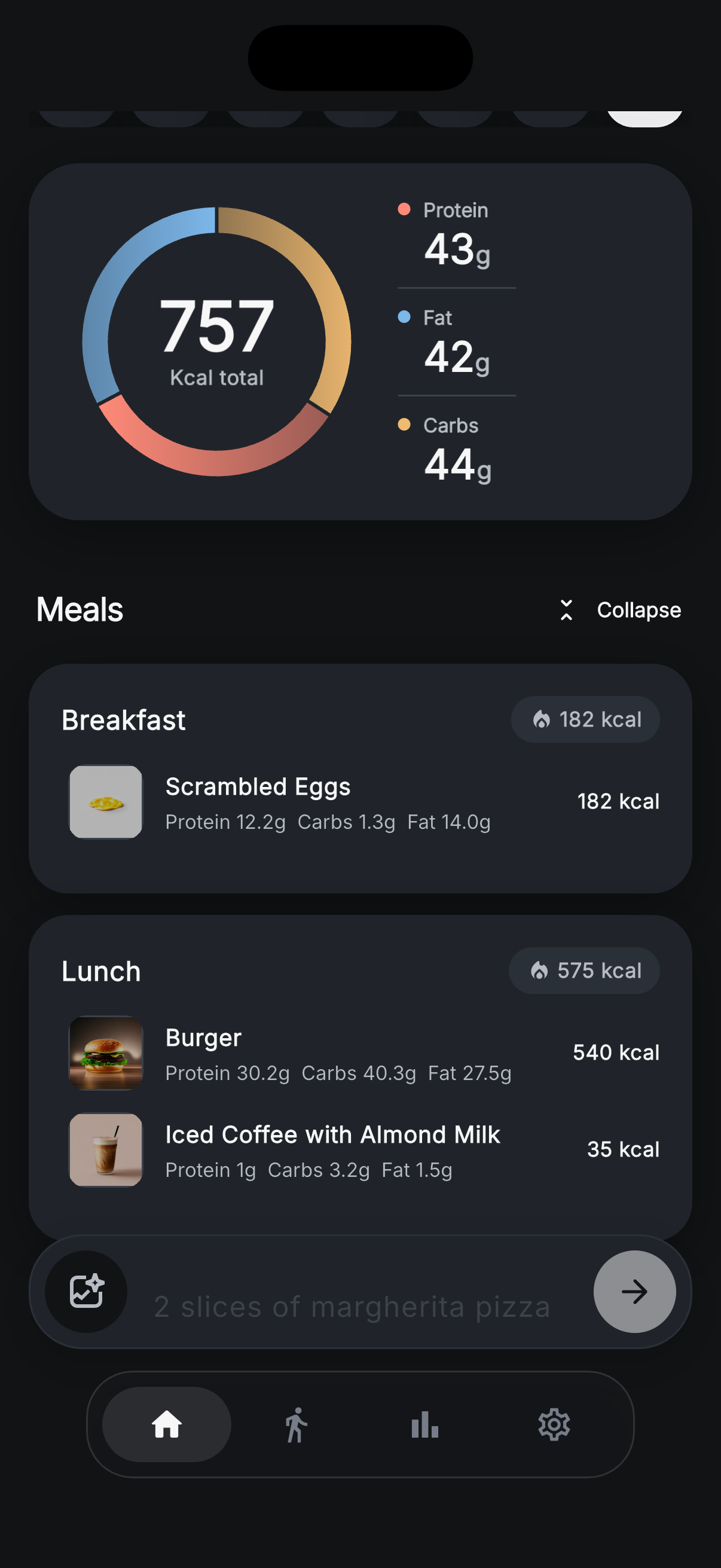
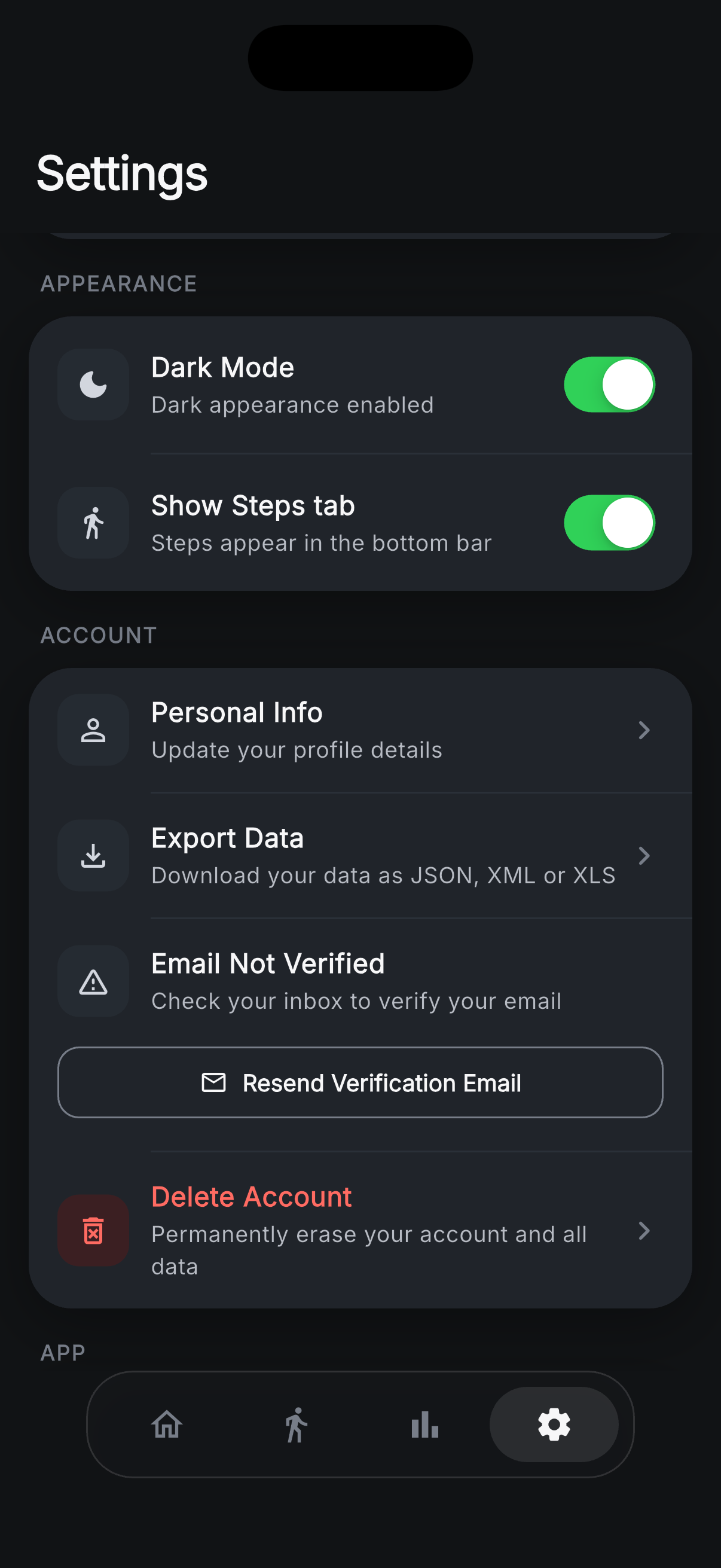
Zuli also has light, dark and system appearance settings. These real app captures show the dashboard and controls. Appearance alone is not a reason to claim one of these products replaces a missing feature in the other.
Which AI calorie tracker is more accurate?
This comparison cannot establish a winner. Recognizing a food is different from knowing its exact weight or recipe. A correct dish name can still come with an incorrect calorie estimate. A useful review would compare both apps on the same measured meals, document corrections, and report errors rather than rely on a screenshot of one successful scan.
In Zuli, review the proposed foods and adjust amounts, calories or macros before saving. If you know the label or weighed ingredients, use that information to correct the estimate. Our AI calorie tracking and accuracy guide explains this workflow with practical examples. No vendor recognition percentage is used here as a calorie-accuracy score.
Before switching calorie tracker apps
- Try ordinary meals. Include a packaged snack, a simple plate and a mixed dish you eat often. Check how much correction each workflow needs.
- Review the edit controls. Make sure you can change portions and food details when a suggestion looks wrong. Confirm the corrected entry reaches your daily totals.
- Check your goals. Calorie and macro targets can differ between apps. Review the settings rather than assuming the same profile produces identical targets.
- Check history portability. Export data you want to retain before closing an account. Zuli exports its own history; that does not imply it imports another app's backup.
- Check billing separately. Review any existing subscription with the store or provider where you purchased it. Deleting an app is not the same action as managing its subscription.
What about missing features or feature requests?
Use current documentation for the feature you need. Cal AI's official FAQ says direct MyFitnessPal history import is unavailable. That is a documented limitation for that migration, rather than a general claim that Cal AI lacks data controls. Source: Cal AI FAQ.
Zuli feedback and feature requests can go to support@zuliai.app. Describe the task you are trying to complete and the screen where you get stuck. Existing app features are shown in our screenshot gallery; planned features are not treated as shipped capabilities in this comparison.
Where should I read Cal AI reviews?
Read recent reviews on the official store listing for your platform, paying attention to version dates and the specific workflow discussed. A complaint about an older version may no longer describe the current app. This page offers a sourced feature comparison, not a substitute for independent reviews or a claim of personal testing.
Try Zuli with your own meals
Start with a meal photo or typed description, review the estimate, then see how the food fits into your day. Free access includes daily AI limits and occasional ads.