Free AI calorie tracker.
Photo. Text. Barcode.
Turn a meal photo or a short description into estimated calories, protein, carbs and fat. Review the foods, correct portions, then save your log. Zuli keeps your daily targets and weekly progress together in one app.
Free, supported by occasional ads. Daily AI limits apply.
AI food logging — with you in control.
Use a photo for a plated meal, text when you know the ingredients, or a barcode for packaged food. Check each estimate before it joins your food diary.
See all 10 app screenshotsSnap a photo
Take a picture of your plate. Zuli estimates the visible foods, portions, calories and macros.
Review and edit
Correct a food, serving size or macro estimate before saving it to your day.
Type naturally
Describe your meal like you'd text a friend. No clunky forms or dropdowns.
Scan barcodes
Scan a packaged food barcode, then check the matched product and serving against its label.
More than a calorie counter — your full nutrition companion.
Every screen below is a real capture from the Zuli app — not a mockup. This is exactly what logging a meal, checking your day and reading your week looks like.
Log a meal in one sentence — or one photo.
Type “2 slices of margherita pizza” or point the camera at your plate. Zuli's AI suggests the foods and portions, then estimates calories, protein, carbs and fat — then hands you the numbers so you can correct anything it got wrong.
- ✓ Plain-English text, meal photos, or a barcode scan
- ✓ Several photos of the same meal analysed together, in one go
- ✓ Every item stays editable — portion, unit, macros and meal type
- ✓ Switch between servings and exact grams or millilitres
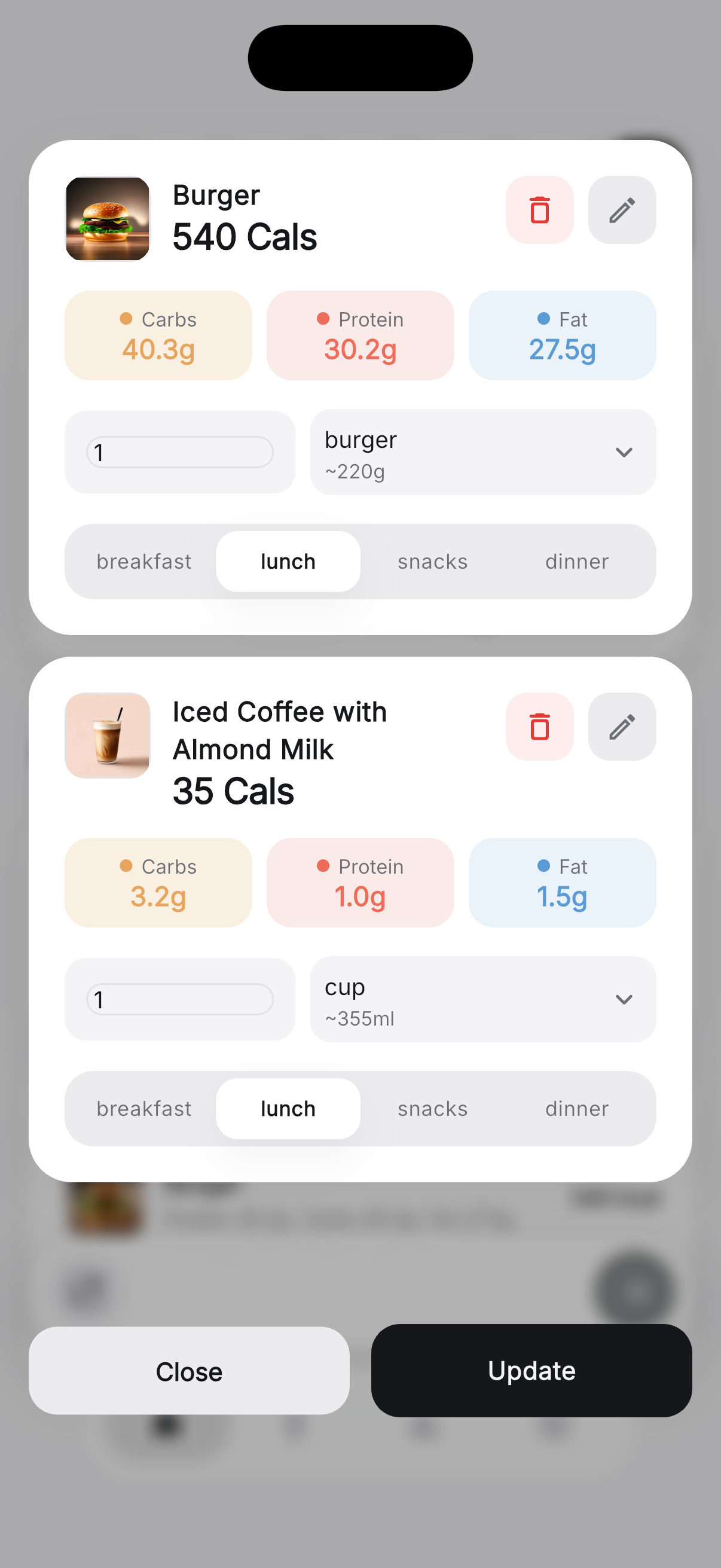 You review before it saves
Know what's left, not just what's eaten.
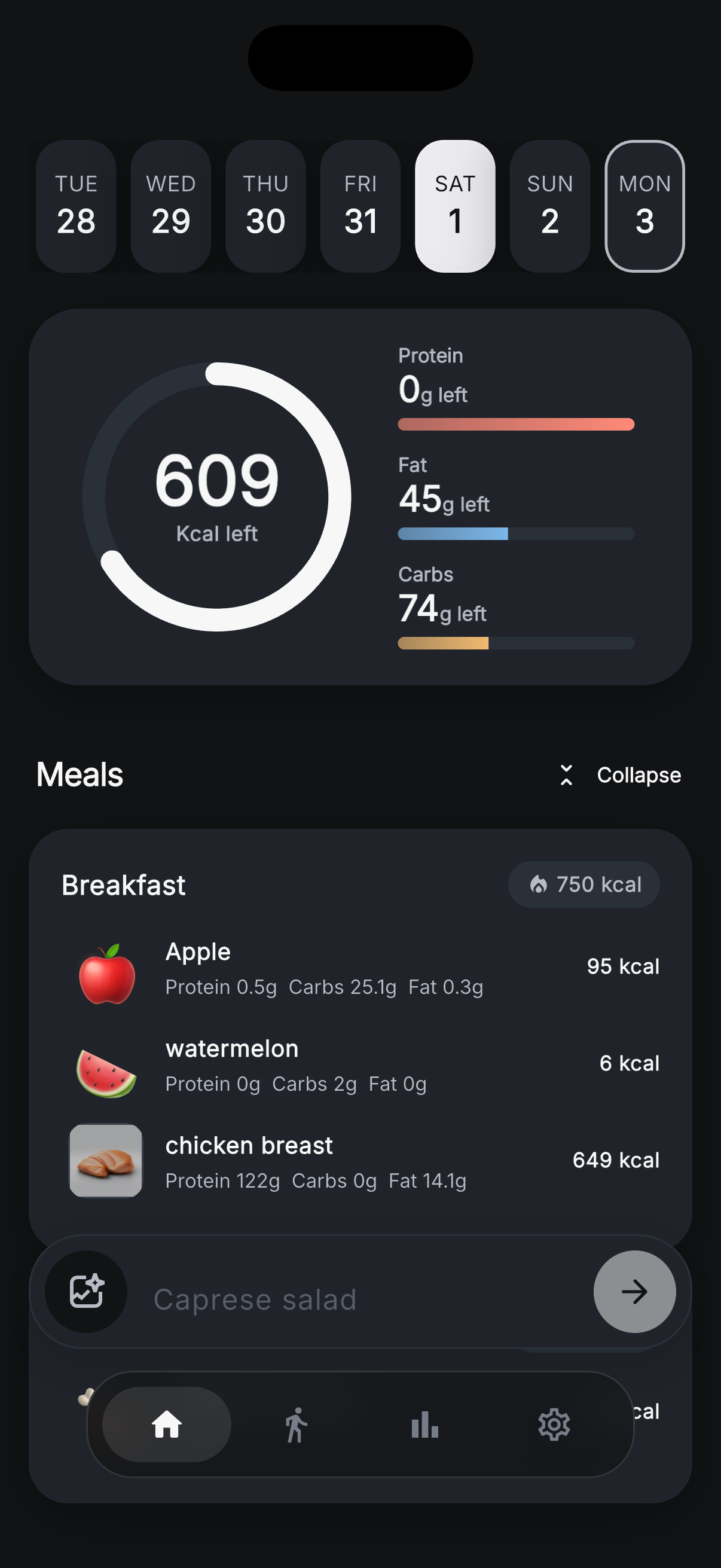
One ring, one number. Zuli shows the calories you have left for the day with a progress bar for each macro underneath, and every meal grouped into breakfast, lunch, snacks and dinner with its own running total.
- ✓ Calories remaining plus protein, carb and fat progress
- ✓ Per-food calories and macros on every row
- ✓ Swipe the week strip to open any past day
- ✓ View cached food history offline; AI analysis needs internet
609 kcal left today
See the week, not just the day.
A single day is only part of the picture. Zuli charts protein, fat, carbs or calories across a whole week, breaks each day into its macro split, and marks every day you logged on a month calendar — so patterns show up long before the scale does.
- ✓ Weekly totals with every single day labelled
- ✓ Stacked carb, protein and fat bars — tap one for detail
- ✓ Month calendar that makes streaks and gaps obvious
- ✓ Step back through previous weeks with one tap
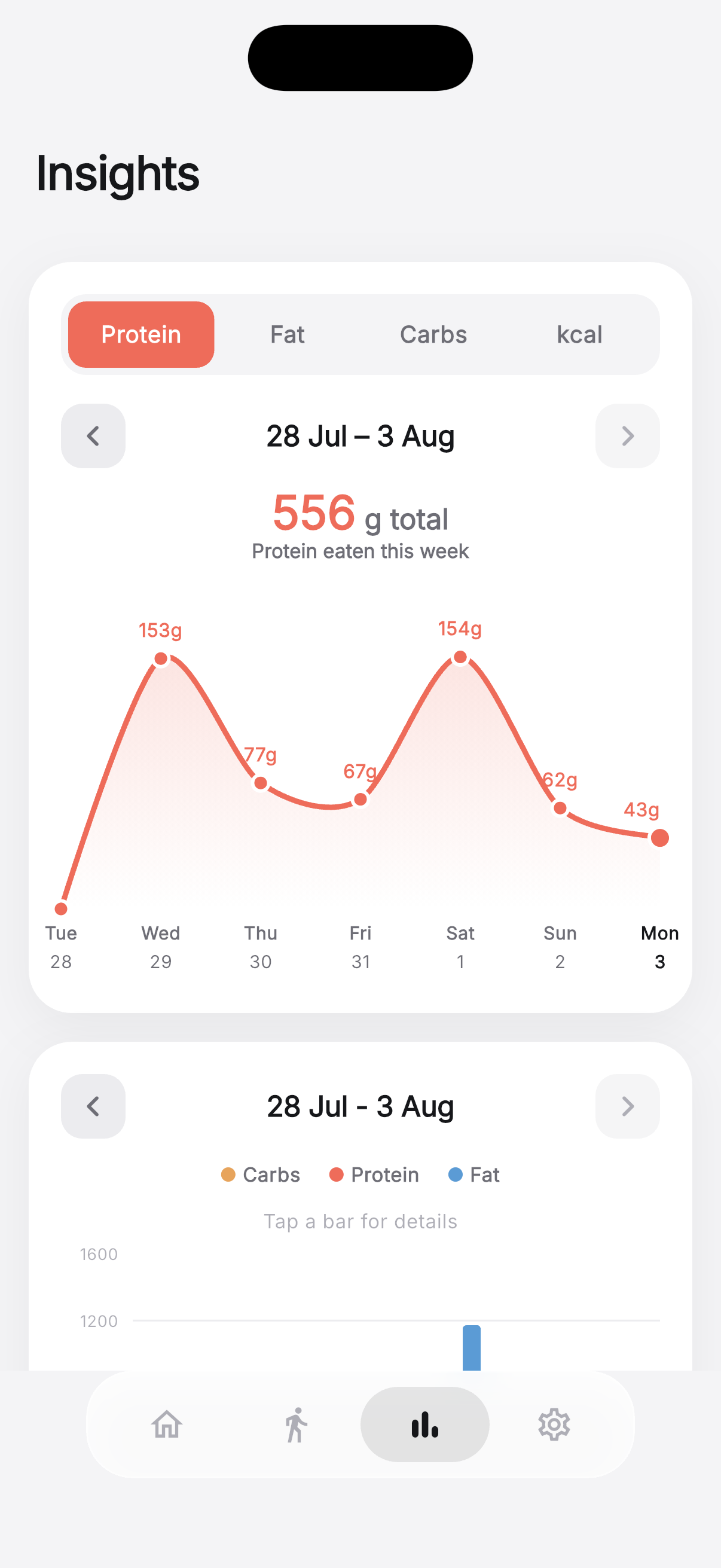 556 g protein this week
Targets you set. Data you can take with you.
A four-step setup calculates your calorie and macro targets from your age, weight, height and goal — then every number stays editable. Steps come straight from Apple Health or Health Connect, and your food history stays exportable.
- ✓ Editable calorie, protein, carb, fat and daily step goals
- ✓ Full light and dark themes, or follow your system setting
- ✓ Export everything as JSON, XML or Excel whenever you want
- ✓ Delete your account and all its data from inside the app
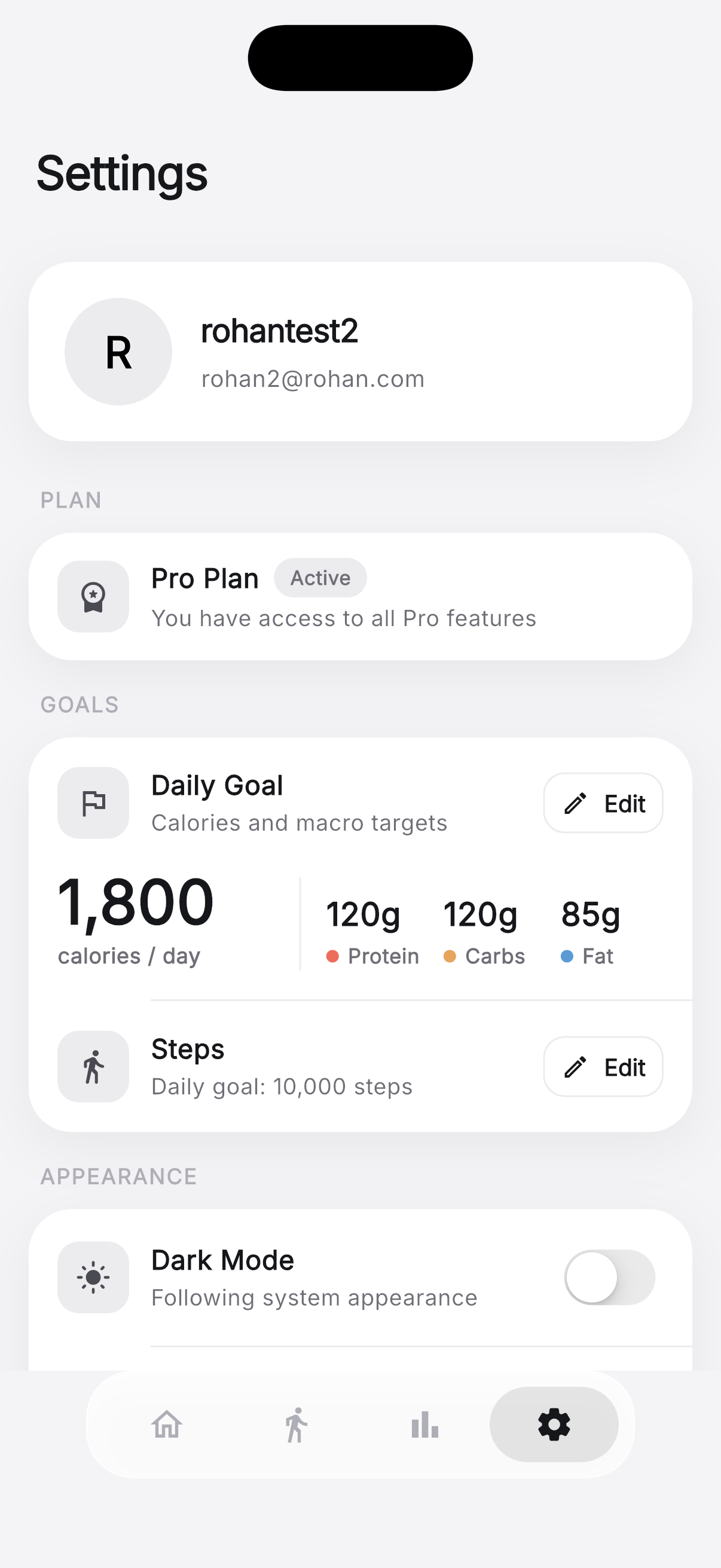 1,800 kcal · 120/120/85 g
Want the full tour? See all 10 app screenshots →
Keep the useful details. Skip the guesswork you can correct.
Dark and light mode
Choose light, dark or your system appearance in Settings. See the dark dashboard.
Editable macro goals
Set daily calorie, protein, carb and fat targets, then adjust them when your needs change.
Reuse saved foods
Pick a food you have logged before when you do not need a new AI estimate.
Steps alongside meals
Connect Apple Health or Health Connect to show step progress beside your food diary.
Take your data with you
Export your profile, goals and food history as JSON, XML or Excel from Settings.
Review weekly patterns
Read calorie and macro charts and a monthly logging calendar alongside each day's entries.
A free AI calorie tracker app, with clear limits
Zuli is free to download and use, supported by occasional ads. AI photo and text analysis have daily usage limits; the app shows your remaining allowance. Barcode lookup and saved-food reuse offer other ways to add food. Check the current app for your allowance.
Available on the App Store and Google Play. Compare access and tradeoffs in our guide to free AI calorie tracker apps.
Understand the app. Check the estimates.
Choose an AI calorie tracker
Compare free access, subscriptions, daily limits and features using official sources.
Zuli and Cal AI compared
Photo logging, price considerations, dark mode and which features to check before switching.
How AI calorie tracking works
What a food photo can tell you, where estimates go wrong, and how to correct them.
Questions, answered.
Is there a free AI calorie tracker?
How does an AI calorie tracker work?
Is AI calorie tracking accurate?
What is the best free AI calorie tracker app?
Does Zuli have dark mode?
Can I log food without an AI photo?
Does Zuli work offline?
Can I export or delete my data?
About Zuli
Zuli is a calorie and macro tracking app developed by Rohan Arora. This website is published by the Zuli team. Our guides explain our own app alongside sourced information about other trackers; they are not independent product reviews.
Questions, corrections or feature requests: support@zuliai.app. Food estimates are for general tracking. See our Terms of Service for limitations.
Start tracking — effortlessly.
Download Zuli free for iPhone or Android. Review your next meal estimate before saving.

